7 Key Functions of Effective Mobile App Onboarding
In short
Effective mobile app onboarding does the job of a sales assistant in a physical store. It has seven functions: confirm the App Store promise, gauge user intentions, ask essential questions, guide users to the right place, show how the app solves their problems, give an immediate benefit before the trial, and evaluate motivation to choose the next step.
We often can’t view our product through the eyes of the user. For them, every app is like a small shop in the vast shopping mall of the App Store.
- The App Store page is your digital storefront. Unlike a physical store’s clear window display, users can’t see everything your app offers at a glance.
- On the storefront, you promise to improve users' lives.
- If the promise resonates with a user, it’s akin to them deciding to step into your physical store. In the digital realm, this means they proceed to download your app. It’s the first commitment they make based on the expectations set by your storefront.
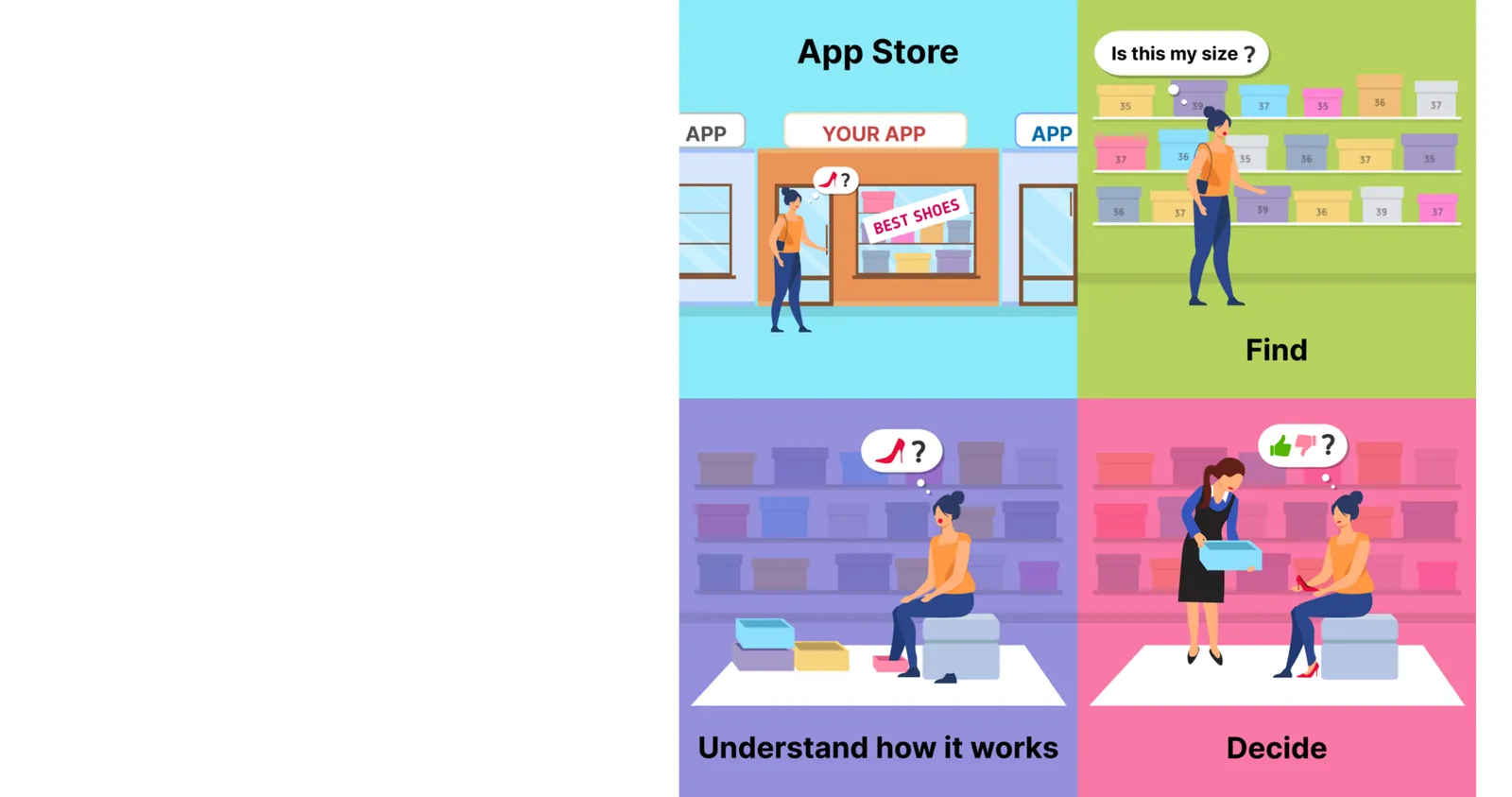
Before making a purchase, users typically want to:
- Find what you promised.
- Understand how it works. Especially for first-time users unfamiliar with such products or services, it’s crucial that they quickly grasp what your app does and how it benefits them.
- Decide if the product suits them.
A sales assistant guides the customer through this journey in a physical store. In the digital world, this crucial role is played by app onboarding!
Let’s move on to the functions of onboarding.
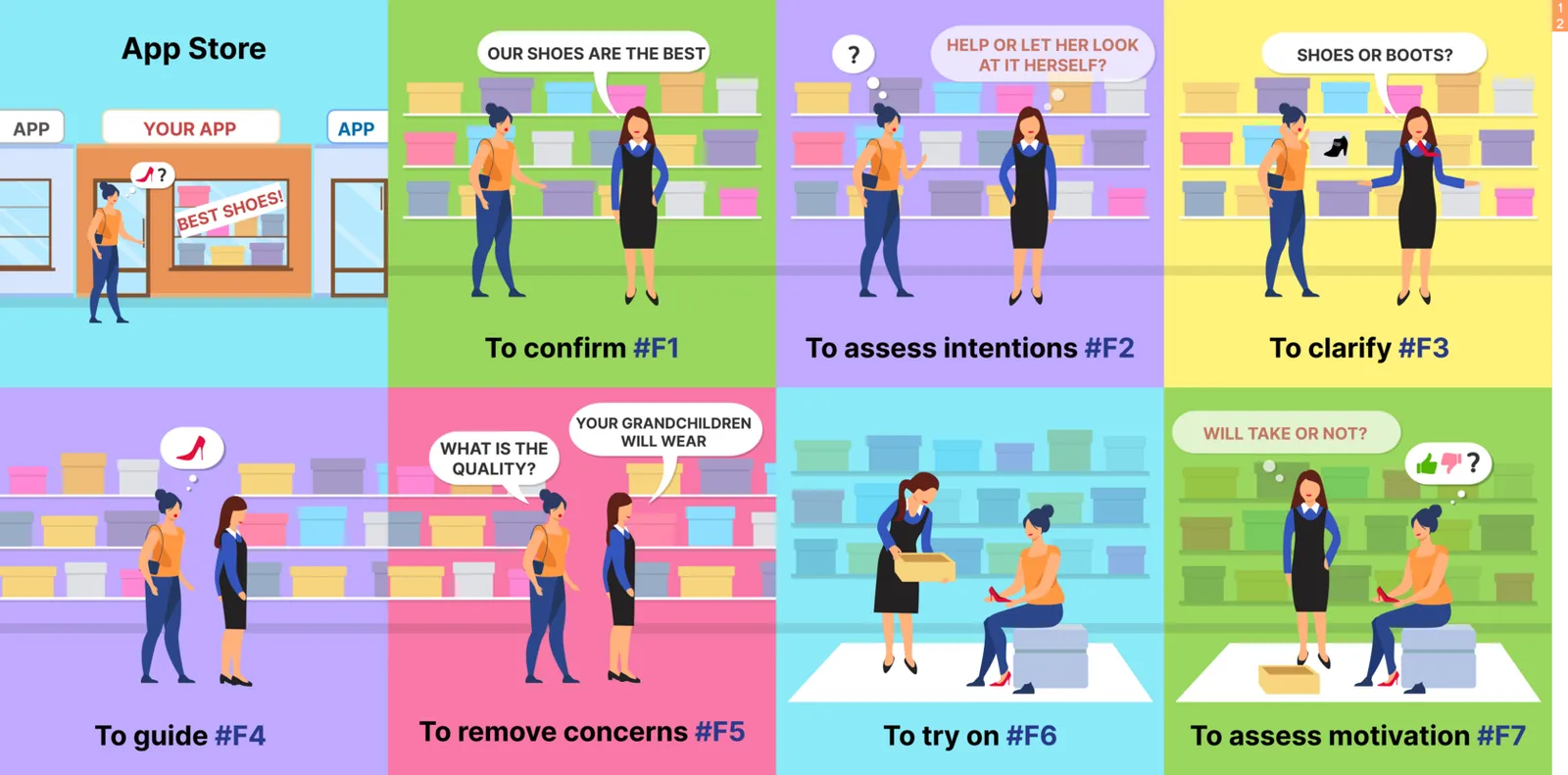
F1. Matching Promises with Reality
Since the App Store page is more like an opaque window, it’s vital that your app immediately shows users it delivers what was promised. Quick confirmation is key — if users don’t find what they expect right away, they’re likely to leave.
Example: Lose It — #22 in Health & Fitness, with its comprehensive approach of ~107 onboarding screens. Here’s how they excel in user engagement:
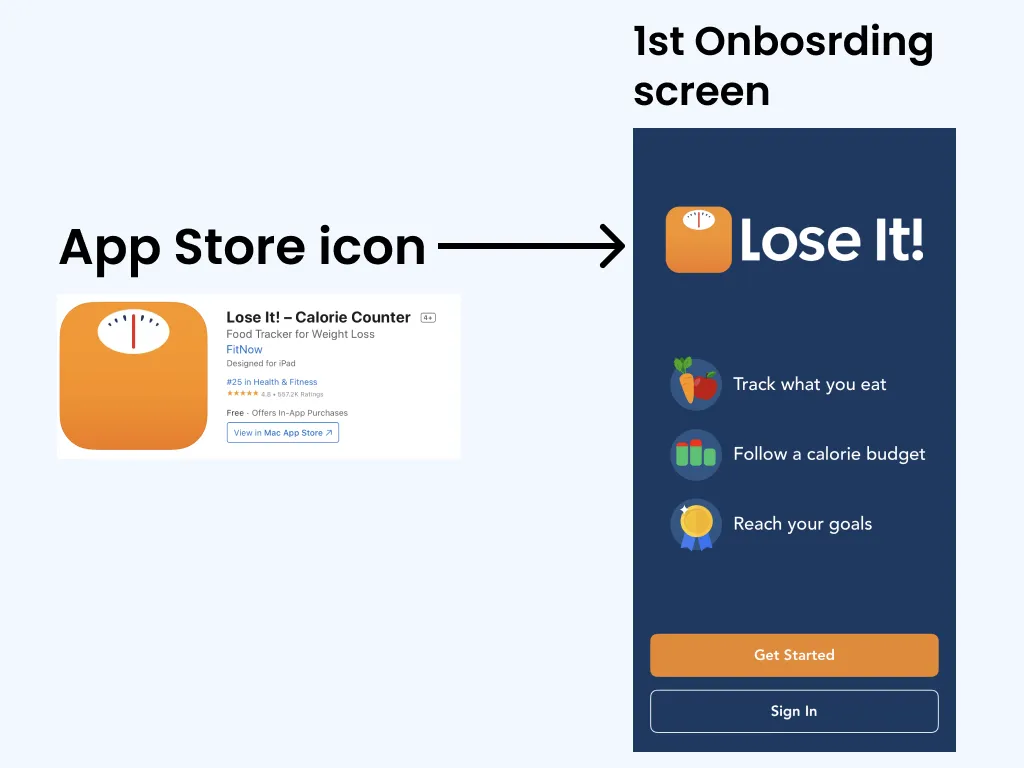
✅ The App Store page promises weight loss, and the first onboarding screen confirms this promise.
- The extensive onboarding process is justified as necessary to guide users towards “LOSING IT”.
- The app methodically outlines the weight loss journey: “Track what to eat” → “Follow calorie budget” → “Reach your goal”.
- To enhance user retention, they use strategies like reinforcing the app’s icon and displaying the app name prominently on the user’s device.
This example showcases how effective onboarding not only fulfills the initial promises but also provides clear guidance for users to achieve their goals, enhancing user retention and satisfaction.
F2. Understanding and Segmenting User Intentions
Onboarding should quickly gauge what users are looking for. Are they eager for guidance, or do they prefer to explore on their own? This assessment is crucial in tailoring the onboarding experience to individual needs and motivations.
Example: InPulse — №49 in Health & Fitness, 4 onboarding screens!
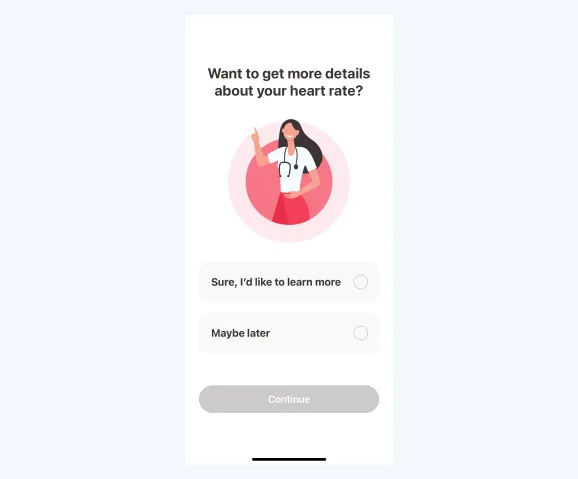
✔️ Segmenting users and activating each segment separately
F3. Engaging Users with Essential Queries
To effectively offer a service or sell a product, you must understand your users deeply. This is not just about casual inquiries; these are essential questions without which you simply cannot deliver the service or product they need. You must ask the right, targeted questions to discern precisely what the user seeks.
This approach is crucial because, without this knowledge, you’re unable to provide the specific help or solution the user came for. Tailor these questions to uncover the core of the user’s needs, ensuring a personalized and relevant experience.
Example: Carb Manager — №135 in Health & Fitness, 13 onboarding screens. Specifies clients’ goals and collects info without which the service cannot be provided.
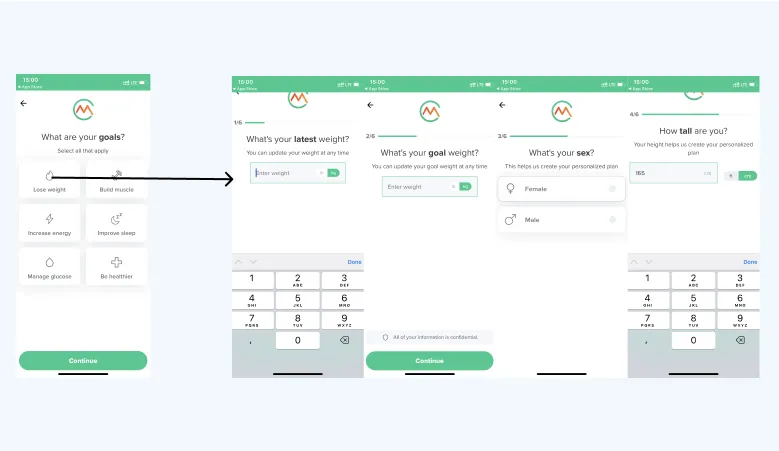
Methods to uncover users’ needs👇
✅ Inquiring about the purpose behind downloading the app
✅ Asking relevant questions that are crucial for delivering the service
Benefits👇
- Tailoring specific questions to different segments
- Separate segments are more effectively motivated for subsequent actions (such as preparing for the final purchase)
F4. Guiding Users to the Right Place
Effective onboarding goes beyond mere assistance; it’s about precisely guiding users to what they specifically need in your app, based on their preferences identified in step 3. The aim is to create an onboarding process that is straightforward, directly leading users to their desired features or services without overwhelming them with extraneous details.
By doing so, we reduce cognitive load and increase user satisfaction. Overloading users with too much information at once can be counterproductive, as it may complicate their journey and lead to frustration or disengagement.
Example: Bumble: Dating & Friends App — #22 in Lifestyle, The Perfect Implementation of #F4
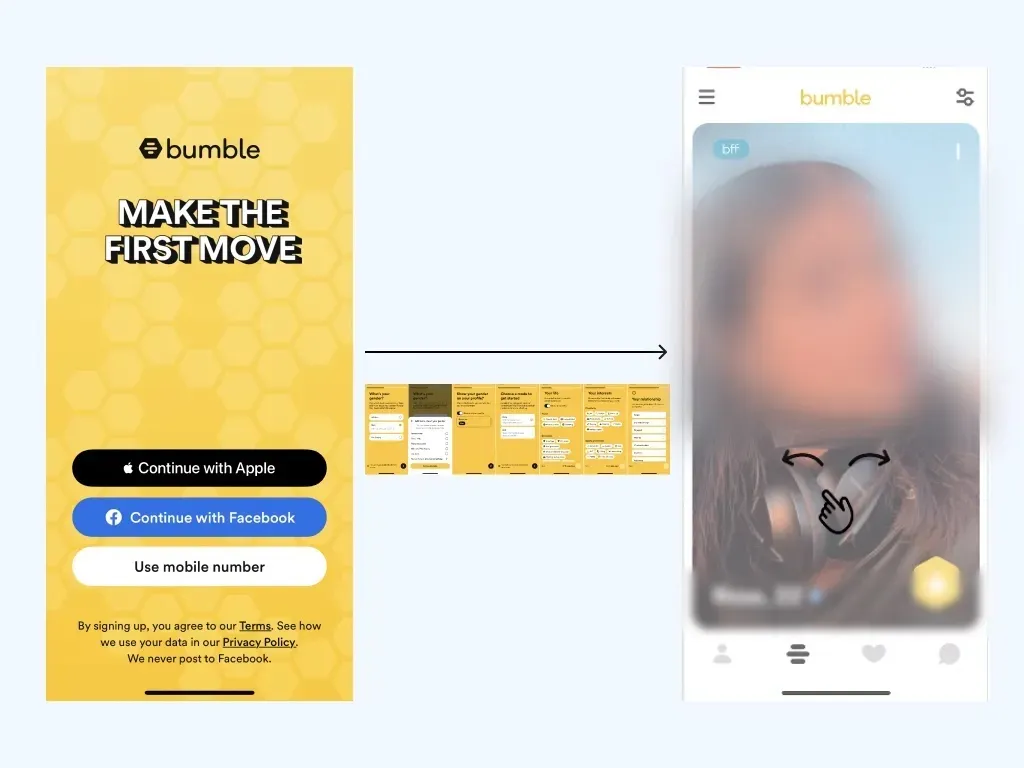
✅ Complete profile setup during onboarding → Immediately after onboarding, a match is suggested
F5. Demonstrating Problem-Solving Abilities to Boost User Motivation
An effective onboarding process goes beyond basic functionality — it should clearly demonstrate how your app directly addresses the specific problems and concerns of the user. This includes showcasing ease of use, quality, price, and relevance. By effectively communicating how your app solves these problems, you not only provide a solution but also significantly boost the user’s motivation to make a purchase. It’s about creating a clear connection in the user’s mind between their needs and how your app meets these needs, ultimately leading them to see the value in investing in your solution.
I will write a separate article on what factors increase user motivation, based on data grounded in psychology and neurophysiology of perception, attention, and motivation.
Example: Lose It — #22 in Health & Fitness.
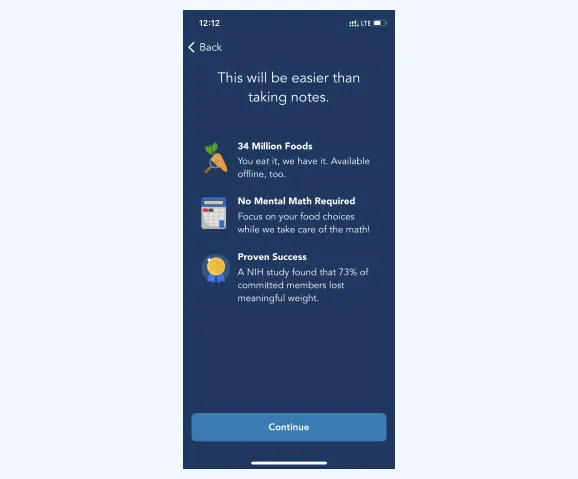
✅ Address concerns about the app’s difficulty, quality, price, and relevance to specific tasks, etc.
F6. Enabling Immediate Benefit Before Offering Trials
In onboarding, it’s crucial to provide users with immediate value, even before suggesting a trial of your product or service. Aim to offer a tangible solution or partial resolution to their problem right from the start. This approach helps users directly experience the benefits your app offers, enhancing their understanding of its value in their lives. It’s about delivering a quick win that showcases the effectiveness of your app, thereby setting the stage for a more committed engagement through a trial offer.
Example: MyNetDiary — №72 in Health & Fitness, 8 onboarding screens
Smart Pre-Paywall Strategy:
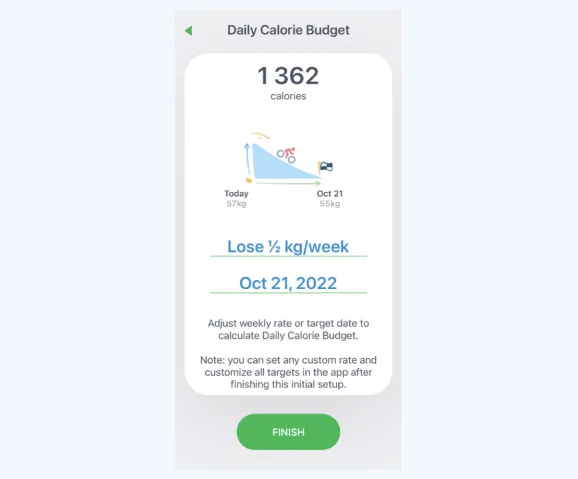
✅ Customized Planning Before Payment Prompt: Before guiding users to the Paywall, MyNetDiary doesn’t just ask for payment; it provides them with a tailored plan, outlining the timeline to achieve their weight loss goals. This approach is not just about setting expectations; it’s about building trust and commitment.
Key Benefits:
- Addressing Doubts: By presenting a clear plan, MyNetDiary addresses potential user doubts about the feasibility of achieving their weight loss goals within a specific timeframe.
- Personalized Journey: Users have the option to choose a weight loss pace that suits them, making the journey feel more personalized and achievable.
- Goal-Oriented: Creating a well-defined goal enhances user motivation. It fosters the impression that their success is just a payment away, thus encouraging them to proceed with the subscription.
Through this thoughtful onboarding strategy, MyNetDiary not only demonstrates its understanding of users’ needs but also effectively aligns its service with their personal goals, enhancing the likelihood of conversion.
F7. Evaluating User Motivation for Tailored Actions
After onboarding, assess the user’s level of engagement to determine the next steps, whether it’s encouraging a purchase or allowing more time for exploration.
Example: Clover Period Tracker — demonstrates a crucial aspect of user engagement: assessing motivation and planning subsequent steps.
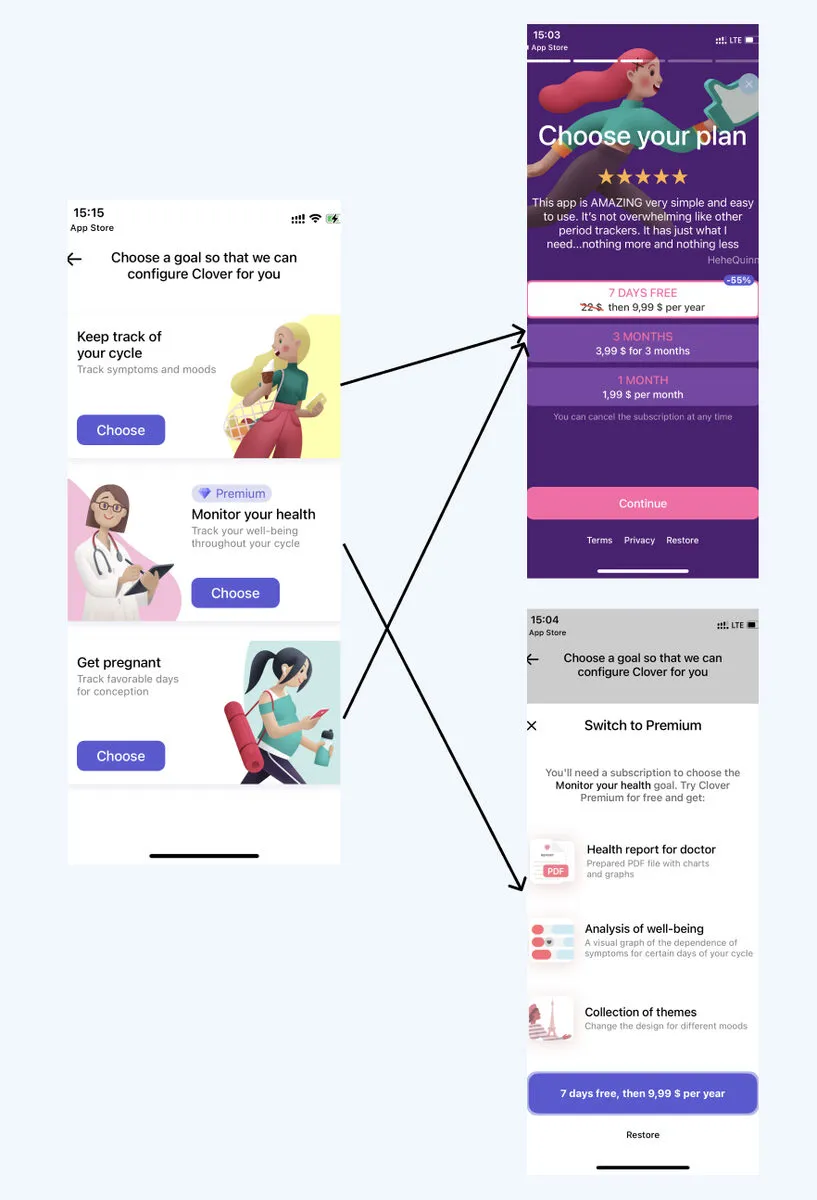
Implementing a Thoughtful Strategy: The app’s approach underlines the importance of:
- Evaluating Purchase Readiness: Offering a purchase option to those who seem ready and motivated.
- Allowing Deliberation: Giving users time to familiarize themselves with the app, ensuring they remember it when they’re ready to commit.
Advantages of This Method:
- Capturing a Broader Audience: By not rushing every user to purchase, Clover avoids alienating potential users who might need more time before deciding.
- Customized Offers: Pricing and promotions can be tailored based on the assessed level of user motivation, enhancing the chances of conversion.
This nuanced approach in onboarding allows Period Tracker — Clover to cater to a diverse user base, recognizing that not every user is on the same path or timeline in their decision-making process. By balancing the urgency of sales with user readiness, they create a more user-centric experience, ultimately leading to higher engagement and satisfaction.
In upcoming publications, we will explore strategies and tactics to design an onboarding process aligned with the USER’S goals, ensuring a seamless and engaging journey from the storefront to loyal usage.
P.S. The best test to determine whether you have a good onboarding process is to imagine that your product is not digital, but rather a service or a physical product you’re selling offline, and your onboarding is a real conversation with a customer who walks into your physical store — Does your onboarding resemble a conversation between a knowledgeable sales consultant and the customer?
Key takeaways
- An App Store page is an opaque shop window, so the first onboarding screen should confirm the promise that made the user download the app.
- Asking why users came lets you segment them and motivate each segment separately.
- Guide each user straight to what they need, as Bumble does by suggesting a match right after the profile is set up.
- A tailored plan before the paywall, like MyNetDiary’s weight-loss timeline, gives users value before you ask them to pay.
- After onboarding, assess motivation: offer the purchase to users who are ready and give the others time, as Clover does.